In Part 1, we looked at the problem: every business question is treated the same, even when the use case calls for something faster, lighter, or more flexible than a dashboard. In Part 2, we introduced the alternative: the Data Answer — a real-time, contextual response that adapts to what the business actually needs.
Now, in the last part of our series, let’s talk about where Data Answers really shine.
Not Every Question Needs a Pipeline. Many Just Need an Answer.
Modern businesses move fast. New priorities emerge weekly, if not daily. But data processes haven’t kept up. The old model — build a full pipeline, validate, publish a dashboard, then iterate — just doesn’t scale when you have dozens or hundreds of questions coming from all parts of the business.
That’s where Data Answers come in. Here are the top use cases where this new model adds real value.
1. Responding to Ad Hoc Business Questions—In Minutes, Not Weeks
“What were our top-selling products in the Northeast last week?”
“Why did churn spike in Q2 for healthcare customers?”
These aren’t dashboard-worthy questions. They’re quick business checks — often time-sensitive and decision-critical.
A Data Answer can surface the answer in minutes, complete with SQL, metadata, and reasoning — so the user gets what they need and moves on. No backlog. No dashboard debt.
2. Validating Ideas and Proving Value Before You Build
“Can we build a model to predict customer drop-off?”
“Is it even possible to join these datasets together?”
“If this hypothesis holds, should we invest more in the use case?”
Before you invest in building pipelines or formal data products, you need to test the idea. Data Answers give you a fast way to explore, iterate, and prove value — without sinking weeks of effort into something that might not pan out or might not even exist.
3. Enabling Agile, Iterative Collaboration Between Business and Data Teams
Business: “Can you show me this by region?”
Analyst: “Sure. Here’s the updated view.”
Business: “Great — now add a view by product type.”
This is how real collaboration happens—through small, rapid iterations. Data Answers are designed for this loop. Each one is traceable, explainable, and versioned—so you can respond in real time without losing clarity or control.
4. Feeding AI Models and Other Applications with Curated, Explainable Data
Not every output is for human eyes. Some Data Answers are designed to feed an AI model, enrich a CRM system, or power an analytics workflow. Because they’re contextualized and flexible, Data Answers can be consumed via MCP/A2A, persisted in a data platform, or shared across systems — without rebuilding pipelines every time.
5. Scaling Self-Service with Guardrails
Self-service doesn’t have to mean “let everyone query the warehouse.” That’s chaotic and hard to govern. With Data Answers, self-service can become guided.
The data team still produces the answer — but it happens fast, in response to a clear business question. And once shared, that answer becomes part of a growing library that business users can explore, trust, and reuse.
It’s a way to scale access without sacrificing quality or control:
- Faster time-to-insight for the business
- Less duplication of effort for the data team
- More relevant context embedded in every answer
Over time, this creates a high-signal repository of real business questions and their answers — accelerating decisions, reducing repeated work, and giving both sides what they need to move faster together.
The Common Thread: Faster Answers, Smarter Decisions
Whether it’s an executive asking a one-time question or a data scientist looking for a clean dataset to experiment with, Data Answers meet consumers where they are — and help them move faster.
They’re not a replacement for pipelines. They’re not the end of dashboards. They’re simply a better starting point for delivering insight — and making sure your efforts actually align with what the business needs.
The Future of Data Delivery Is Agile
Think of Data Answers as your minimum viable insight — a way to get value into the hands of the business quickly, then decide where to take it next. If it’s valuable, evolve it. If not, move on.
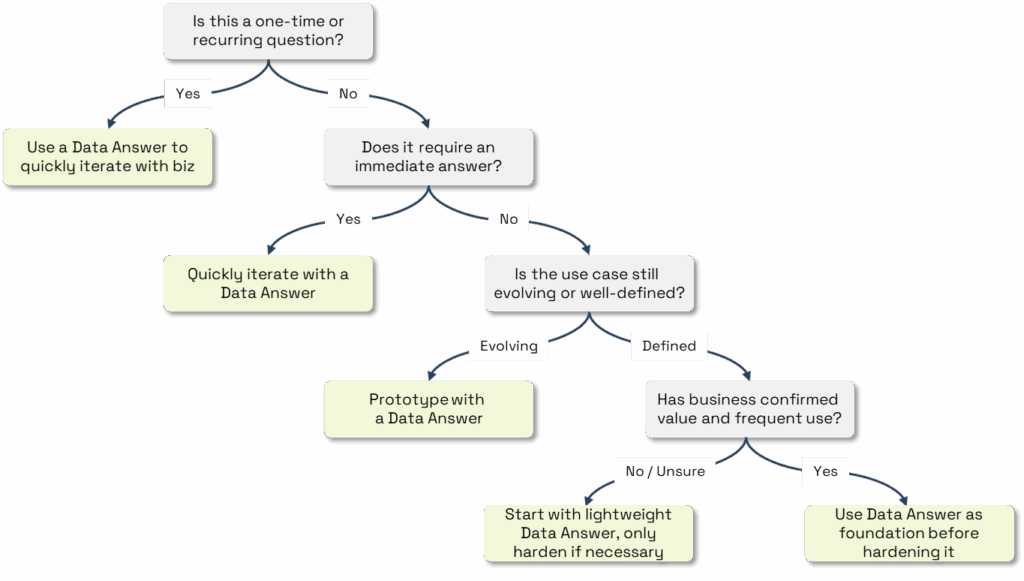
It’s a smarter, more scalable approach to answering questions in a world where speed, clarity, and context are everything.
Wrapping Up: The Data Answer Series — In Case You Missed It
- Post 1: Why Every Business Question Doesn’t Deserve a Dashboard
- Post 2: Introducing the Data Answer: Fast, Flexible, and Adaptable to Your Business Needs
White Paper: Data Answers — A Faster, Smarter Way to Enterprise Analytics
Curious to see more? Reach out to us to schedule a live demo.
SHARE THIS: