
After a year of agentic proof-of-concepts, enterprises have reached an uncomfortable conclusion: most “talk to your data” agents fall short of the accuracy threshold required for production use. The problem isn’t that we need better LLMs — it’s that we need better architecture.
Research validates this repeatedly: semantic layers reduce Gen AI data errors by 66%, improve accuracy, and enable production-grade AI analytics where raw schema approaches fail.
But semantic layers aren’t the end-all-be-all — they are only part of the context architecture that addresses three fundamental problems preventing AI analytics from scaling: distributed data access, fragmented business context, and platform-specific agent limitations. While critical for consistent business logic and metrics, semantic layers work best as part of a comprehensive context strategy.
This playbook explains why semantic layers are essential for AI-powered analytics, where they fit in the broader context architecture, and how to implement them successfully alongside the other critical context pieces.
Read the Gartner report about the inevitable rise of self service data management and what you can do now to be prepared.
The AI Disconnect: Why Architectural Problems Break AI Analytics
The explosion of conversational analytics agents has revealed a fundamental mismatch between AI capabilities and enterprise data architecture. Understanding this “AI Disconnect” is essential for building semantic layers that actually solve production problems.
Problem 1: Distributed Data Without Federation
The Reality:
High-value business questions rarely live in a single database. Consider a simple example:
“What’s our customer acquisition cost by region for our enterprise product tier in Q4?”
This question requires:
- Customer data from Salesforce
- Product usage data from Snowflake or Databricks
- Marketing spend data from financial systems
- Territory definitions from geographic databases
In large enterprises, dozens of core platforms and applications support high-value data. Even when organizations invest in modern data platforms for consolidation, critical data often remains on legacy systems that can’t be easily migrated.
The Architectural Gap:
Today, there’s no easy way to access data in real-time across multiple data stores without:
- Moving data (creating duplicates and staleness)
- Constructing pipelines ahead of time (killing ad-hoc capability)
- Manual integration for each new question (overwhelming data teams)
What This Means for AI Analytics:
Platform-specific agents can only see data within their platform. When asked questions requiring cross-system data, they either fail silently, hallucinate connections that don’t exist, or force users back into manual workflows.
Problem 2: Fragmented Context Without Unification
The Reality:
Business questions use business terms — “revenue,” “churn,” “active customer” — but mapping these terms to enterprise data is non-trivial context engineering.
When a CRO asks: “What’s revenue tied to specific territories for this product category?”
The system needs:
- Technical metadata: Which tables and columns contain the relevant data?
- Business context: How does this company define “revenue”? (Recognized? Booked? Gross? Net?)
- Persona-specific logic: Financial analysts and sales operations may need different data sets for similar questions
- Domain knowledge: What are the valid territories? Product categories? Time periods?
The Architectural Gap:
This context is fragmented across the enterprise today:
- Business rules in data catalogs (sometimes)
- Definitions in BI tool semantic layers (tied to specific dashboards)
- Golden queries in analyst heads or documentation
- Metric calculations scattered across tools and teams
There’s no consistency of practice and no single source of truth.
What This Means for AI Analytics:
LLMs cannot derive context from raw schemas. Without unified context, they guess at:
- Which tables contain relevant data (hallucinating connections)
- How metrics should be calculated (inventing formulas)
- What filters and business rules apply (missing critical logic)
- How terms map to technical structures (misinterpreting intent)
Research shows this fragmentation drops AI accuracy from 90%+ to 10-20%. The gap isn’t model capability — it’s missing architectural infrastructure.
What is a context graph and why are they the next evolution of context engineering?
Get your comprehensive guide now.
Problem 3: Platform-Specific Agents Without Flexibility
The Reality:
True self-service means meeting users where they are:
- Executives in Microsoft Copilot or enterprise ChatGPT
- Analysts in Slack or Teams
- Business users in domain-specific applications or BI tools
- Data scientists in Jupyter notebooks or ML platforms
Each persona has different capabilities, patience levels, and interaction patterns:
- Power users: Need iterative, hands-on exploration for complex hypotheses
- Casual business users: Want simple questions with immediate answers
- AI agents: Require API access and machine-readable responses
The Architectural Gap:
Most agents today are statically tied to specific platforms or context stores:
- Snowflake’s Cortex Analyst only sees Snowflake data
- BI tool agents only access their specific semantic models
- Data catalog agents can discover but not execute queries
- Custom agents require hard-coded integrations
There’s too much friction with platform-specific agents to enable effective self-service.
What This Means for AI Analytics:
True self-service requires “any to any” linkage:
- Any channel for any user
- Linked to any data platform and context source
- Subject to appropriate access control
- With dynamic provisioning based on the question being asked
Without this flexibility, organizations deploy multiple isolated agents that can’t share context, can’t access distributed data, and can’t meet users in their natural workflows.
The Five Levels of Context: Where Semantic Layers Fit
Semantic layers solve critical problems, but they’re only part of a holistic context architecture. Understanding all five levels helps architects know what to build and evaluators know what to assess — and why semantic layers alone won’t deliver production-grade accuracy.
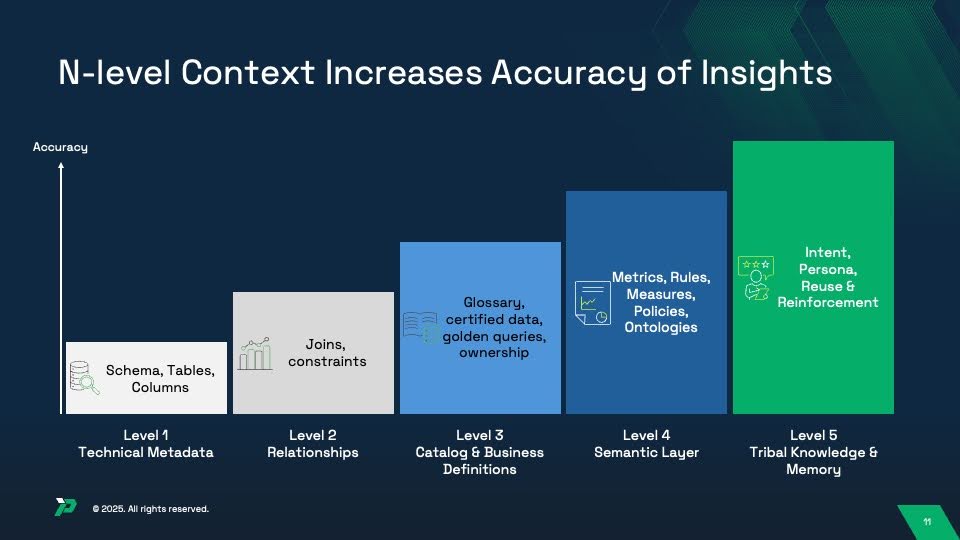
Level 1: Technical Metadata (Foundation)
What It Includes:
- Database schemas, tables, columns, data types
- Basic table and column statistics (row counts, cardinality)
Why AI Needs This:
- Prevents hallucination of non-existent tables/columns
- Provides basic structure understanding
- Shows data types and constraints
Alone, This Achieves: 10-20% accuracy (LLMs can see structure but lack understanding of relationships or meaning)
Not Semantic Layer Territory: This is foundational schema metadata that exists in every database.
Level 2: Relationships (Joins & Constraints)
What It Includes:
- Primary keys and foreign keys
- Valid join paths between tables
- Referential integrity constraints
- Cardinality rules (one-to-many, many-to-many)
Why AI Needs This:
- Eliminates hallucinated joins and incorrect table relationships
- Defines valid connection paths across data
- Prevents many-to-many explosion errors
- Shows how data entities relate
Combined with Level 1: 30-40% accuracy (correct structure and relationships, but no business meaning)
Not Semantic Layer Territory: This is relationship mapping — often defined in data models, ERDs, or database constraints.
Level 3: Catalog & Business Definitions (Governance Layer)
What It Includes:
- Business glossaries mapping technical names to business terms
- Certified datasets and trusted data sources
- Data ownership and stewardship information
- Golden queries showing “correct” ways to answer common questions
- Column descriptions and domain taxonomies
Why AI Needs This:
- Maps business language to technical structures
- Disambiguates terms with multiple meanings
- Shows which data is authoritative and certified
- Provides examples of validated query patterns
Combined with Levels 1-2: 50-65% accuracy (understands meaning but lacks calculation logic)
Not Semantic Layer Territory: This lives in data catalogs like Alation, Collibra, or Atlan — separate from semantic layers but essential for accuracy.
Level 4: Semantic Layer (Metrics, Rules & Policies) ← YOU ARE HERE
What It Includes:
- Metric definitions (“revenue” formula, “churn” calculation)
- Business rules (fiscal calendars, inclusion/exclusion criteria)
- Dimensional hierarchies and rollup logic
- Access policies and row-level security
- Ontologies defining business concepts and relationships
Why AI Needs This:
- Ensures consistent calculation across tools
- Applies company-specific business rules
- Handles complex multi-step computations
- Enforces governance dynamically
- Maintains metric definitions aligned with existing reports
Combined with Levels 1-3: 75-85% accuracy (strong foundation with consistent business logic)
THIS IS SEMANTIC LAYER TERRITORY: This is what BI tools (Tableau, Looker, dbt, LookML), warehouse-native capabilities (Snowflake Semantic Views, Databricks Unity Catalog), and independent semantic layer platforms provide.
Level 5: Tribal Knowledge & Memory (Intent & Reinforcement)
What It Includes:
- User intent and persona-specific interpretations
- Query reuse patterns and successful answer templates
- User feedback on answer quality (thumbs up/down, corrections)
- Reinforcement learning from successful queries
- Historical context from past conversations
Why AI Needs This:
- Personalizes responses to user expertise level and role
- Reuses validated queries for common questions
- Learns from user feedback and corrections
- Maintains conversational context across turns
- Adapts to ambiguous questions based on past interactions
Combined with Levels 1-4: 94-99% accuracy (production-grade AI analytics with continuous improvement)
Beyond Semantic Layer Territory: This requires memory systems, feedback loops, and reinforcement learning — capabilities that extend beyond traditional semantic layer scope.
The Critical Insight: Semantic Layers Are Necessary But Not Sufficient
The semantic layer (Level 4) is absolutely critical. Without it, you get:
- Inconsistent metric calculations across users and tools
- No enforcement of business rules or fiscal calendars
- Lost business logic requiring analyst intervention
- Failed governance and security policies
But implementing only a semantic layer means stopping at 75-85% accuracy. Production-grade systems achieving 94-99% accuracy combine:
- Levels 1-2: Technical foundation (schema + relationships)
- Level 3: Business definitions from data catalogs
- Level 4: Semantic layer with metrics and rules ← The focus of this playbook
- Level 5: Memory and continuous learning
This playbook focuses on Level 4 (semantic layers) but acknowledges that production deployments require all five levels working together.
Semantic Layer Architecture: The Five Essential Components
Now, let’s examine the five architectural components that make semantic layers effective.
Modern semantic layers comprise three integrated components that work together to translate business questions into accurate, governed insights:
Component 1: Metrics & Calculations (The “What”)
Purpose: Define how business concepts are calculated consistently
What It Contains:
- Metric definitions: Explicit formulas for revenue, churn, CAC, LTV, and other KPIs
- Aggregation rules: How metrics roll up across dimensions (sum, average, weighted average, distinct count)
- Derived attributes: Calculated fields that combine multiple data sources or columns
- Measure hierarchies: How metrics relate (gross revenue → net revenue → recognized revenue)
Implementation Approaches:
Declarative definitions (YAML, LookML, SQL) allow:
- Version control with git workflows
- Code review and testing processes
- Reusable components and inheritance
- Platform portability
Visual modeling tools enable:
- Business user participation in definition
- Drag-and-drop metric building
- Interactive testing and validation
- Lower technical barrier to entry
Example Metric Definition (dbt):
metrics:
  - name: monthly_recurring_revenue
    label: Monthly Recurring Revenue (MRR)
    model: ref('subscriptions')
    calculation_method: sum
    expression: subscription_amount
    filters:
      - field: subscription_status
        operator: '='
        value: "'active'"
      - field: billing_frequency
        operator: '='
        value: "'monthly'"
Best Practices:
- Start with high-value domains (Sales, Finance) before enterprise-wide rollout
- Document calculations with examples and edge cases
- Test metric definitions against existing BI tool results for consistency
- Establish governance process for approving new metrics
- Version control all metric definitions
Component 2: Business Rules & Context (The “How”)
Purpose: Define the business logic that governs how data is interpreted and filtered
What It Contains:
- Fiscal calendars: How your organization defines quarters, years, and time periods
- Time dimensions: Standard time hierarchies (Year → Quarter → Month → Week → Day)
- Dimensional hierarchies: Geographic rollups (Country → State → City), organizational rollups (Company → Division → Department)
- Inclusion/exclusion rules: What data should be filtered (exclude test accounts, internal transactions, cancelled orders)
- Data quality rules: Minimum thresholds for completeness, validity checks
- Business logic: Tiering rules (customer segments), categorization logic, status definitions
Implementation Approaches:
Time-based rules:
- Fiscal year start dates (e.g., February 1 for retail, October 1 for government)
- Working day vs. calendar day calculations
- Seasonality adjustments
- Trailing period definitions (last 30 days, MTD, QTD, YTD)
Business classification rules:
- Customer tier definitions (Enterprise: >$100K ARR, Mid-Market: $25K-$100K, SMB: <$25K)
- Product category mappings
- Geographic territory assignments
- Deal stage progressions
Data quality thresholds:
- Required field completeness percentages
- Value range validations
- Referential integrity checks
- Outlier detection parameters
Best Practices:
- Document the “why” behind rules, not just the “what”
- Centralize fiscal calendar definitions (don’t let each tool define differently)
- Version control rule changes with effective dates
- Test rules against historical data before deploying
- Make rules explicit (don’t hide in SQL WHERE clauses)
Component 3: Access Policies & Governance (The “Who”)
Purpose: Define who can see what data and which metrics they’re authorized to access
What It Contains:
- Row-level security policies: Users see only data for their territory, department, or authorization level
- Column-level masking rules: PII redaction, data anonymization, partial masking
- Metric-level permissions: Which users/roles can access sensitive metrics (revenue, margin, compensation)
- Object-level security: Who can create, modify, or delete metric definitions
- Audit policies: What access events require logging for compliance
Security Implementation Patterns:
Attribute-based access control (ABAC):
- Dynamic filtering based on user attributes (region, department, role)
- Policies like “Users can only see customers in their assigned territory”
- More flexible than static group-based permissions
Policy definition examples:
row_level_security:
  - policy_name: sales_territory_filter
    description: Users see only their assigned sales territories
    rule: |
      WHERE territory IN (
        SELECT territory FROM user_territories
        WHERE user_id = CURRENT_USER()
      )
    applies_to:
      - opportunities
      - accounts
      - deals
Column masking:
column_masking:
  - column: social_security_number
    mask_type: partial
    mask_pattern: "XXX-XX-####"
    applies_to_roles:
      - analyst
      - reporting
    unmasked_for_roles:
      - compliance_officer
      - legal
Best Practices:
- Integrate with enterprise identity systems (don’t create separate user management)
- Test policies with personas representing different access levels
- Audit all policy changes and access events
- Document compliance requirements each policy addresses
- Default to deny (explicit grants, not implicit)
- Make policies transparent to users (they should know what they can’t see)
What’s NOT Part of the Semantic Layer
It’s important to distinguish the semantic layer itself from the infrastructure that uses it:
NOT Semantic Layer (These are infrastructure):
- Data access layer / federation engine: Connects to databases and executes queries
- Query optimizer: Determines how to execute queries efficiently
- Caching layer: Stores query results for performance
- API layer: Exposes semantic layer to consuming applications
- Natural language interface: Translates questions into semantic queries
Why This Matters:
The semantic layer is declarative — it defines business logic, metrics, and rules in a platform-independent way. The execution infrastructure is imperative — it actually runs queries.
This separation allows:
- Portability: Semantic layer definitions can work across different query engines
- Reusability: Same metrics used by BI tools, AI agents, embedded analytics, APIs
- Governance: Change metric definition once, applies everywhere
- Testing: Validate metric logic independent of execution performance
Think of it this way: the semantic layer is the recipe (ingredients and steps), while the infrastructure is the kitchen (stove, oven, utensils). You can cook the same recipe in different kitchens.
Design Patterns: Matching Architecture to Enterprise Reality
Not all semantic layers are created equal. The right architecture depends on your data distribution, organizational structure, and use case requirements.
Pattern 1: Federated Semantic Layer (Recommended for Most Enterprises)
When to Use:
- Data distributed across multiple platforms (Snowflake + Databricks + Salesforce + legacy systems)
- Need real-time access without data movement
- Multiple business units with different data governance
- AI agents require cross-system context
Architecture:
Unified Semantic Layer Platform
    ↓
Federated Query Engine
    ↓
Real-time connections to:
    - Cloud Data Warehouses (Snowflake, Databricks, BigQuery)
    - SaaS Applications (Salesforce, Workday, ServiceNow)
    - Legacy Systems (Oracle, SAP, DB2)
    - Operational Databases (PostgreSQL, MySQL, MongoDB)
Key Characteristics:
- Zero-copy federation: Query data where it lives
- Unified context layer: Aggregate metadata across all sources
- Open architecture: Works with any consumption tool or agent
- Dynamic provisioning: Connect to appropriate sources based on question
Advantages:
- Solve the distributed data problem without migration
- Maintain single source of truth for business definitions
- Support any agent or consumption pattern
- Preserve existing platform investments
Implementation Considerations:
- Requires semantic layer platform (not warehouse-native)
- Network connectivity between semantic layer and all data sources
- Query performance depends on source system capabilities
- Security policies must work across platforms
Best For Organizations That:
- Have hybrid cloud or multi-cloud data environments
- Cannot migrate data off legacy systems
- Need to support multiple AI agents and tools
- Prioritize flexibility over single-platform optimization
Pattern 2: Warehouse-Native Semantic Layer
When to Use:
- Standardized on single data platform (Snowflake or Databricks)
- Most data already consolidated in warehouse
- Want tight integration with platform features
- Accept platform-specific implementation
Architecture (Snowflake Example):
Snowflake Semantic Views (YAML definitions)
    ↓
Stored in Information Schema
    ↓
Query rewriting at database level
    ↓
Execution on Snowflake compute
    ↓
Consumption via:
    - Cortex Analyst (natural language)
    - BI Tools (ODBC/JDBC)
    - Applications (SQL API)
Key Characteristics:
- Native integration: Semantic metadata stored as database objects
- Zero external dependencies: No additional platforms to manage
- Platform optimization: Leverage warehouse-specific features
- Tight security integration: Inherits platform access controls
Advantages:
- Minimal infrastructure overhead
- Seamless integration with platform security
- Native performance optimization
- Simpler operational model
Limitations:
- Platform lock-in (Snowflake metrics can’t be used on Databricks)
- Limited cross-platform federation
- BI tool support may require custom SQL integration
- No native version control (must export/import YAML)
Best For Organizations That:
- Have successfully consolidated data onto single platform
- Prioritize simplicity over flexibility
- Don’t need cross-platform federation
- Accept vendor-specific implementation
Pattern 3: Hybrid Semantic Layer
When to Use:
- Core analytics on single platform but operational data distributed
- Need both warehouse-native and federated capabilities
- Different use cases have different requirements
- Want gradual migration path
Architecture:
Enterprise Semantic Layer (federation + unified context)
    ↓
Connects to:
    - Warehouse-Native Semantic Layer (Snowflake/Databricks)
    - SaaS Applications (direct connections)
    - Legacy Systems (via federation)
    ↓
Unified metadata and governance across all sources
Key Characteristics:
- Best of both worlds: Leverage warehouse-native where appropriate, federate where necessary
- Phased approach: Start with single platform, expand over time
- Flexible consumption: Support both platform-native and cross-system queries
- Unified governance: Consistent policies regardless of data location
Implementation Strategy:
- Phase 1: Deploy warehouse-native semantic layer for core analytics
- Phase 2: Add federation layer for operational and SaaS data
- Phase 3: Unify context and governance across all sources
- Phase 4: Enable AI agents with cross-system access
Best For Organizations That:
- Are mid-migration to modern data platform
- Have both consolidated and distributed data
- Need flexibility for different use cases
- Want to preserve optionality
The Bottom Line: Architecture Determines AI Analytics Success
The explosion of “talk to your data” agents revealed an uncomfortable truth: most fail not because of inadequate LLMs but because of architectural gaps that no amount of prompt engineering can overcome.
The Three Problems:
- Distributed data across platforms that agents cannot access in real-time
- Fragmented context that LLMs cannot derive from raw schemas
- Platform-specific agents that cannot meet users in their natural workflows
Organizations deploying AI analytics without necessary context engineering infrastructure will repeat the failures of the past year: impressive demos that can’t reach production accuracy. Those building proper architectural foundations will enable the self-service analytics that enterprises have pursued for decades.
What does it take to build an enterprise data analytics agents?
Read the blueprint from BARC
Evaluate accordingly. The accuracy of your AI analytics depends on it.
To learn more about how Promethium enables you to use all your context to talk to all your data, reach out to our team for a demo.
Share This Article
SHARE THIS:



Share This Article
SHARE THIS: